LinkedIn now uses a system called Profile Relevance to show posts to people who do not follow you, by matching the post to a reader’s job, industry, location, and other professional details. In tests reported on November 9, 2026, LinkedIn said the system raised feed updates viewed by 0.54%, raised viral rate by 0.94%, and cut the hide rate (how often people hide a post) by 18.8%. For your next LinkedIn post, name who it is for in the opening line, and say that topic out loud if you are on video.
By Nate Sampson, Social Pro Video (Alpharetta, GA)
This is for Corporate • Tech • Commercial • Professional teams in Alpharetta, Johns Creek, Milton, and Cumming who post on LinkedIn. Profile Relevance looks at professional details a member chose to put on their profile, then looks for posts that fit.
What is LinkedIn Profile Relevance?
It is a way for LinkedIn to show you useful posts from people you do not already follow. LinkedIn calls those posts Unconnected Content, meaning posts from outside your network.
In a November 9, 2026 post on the LinkedIn Engineering Blog, engineer Shiyong Lin explained how it works. LinkedIn builds a short professional summary from a member’s public profile, including headline, summary, key skills, work history, and education. It does not include the member’s name or gender.
For each post, LinkedIn builds a similar summary from the post text, titles, and transcripts, plus the author’s location when it is available. Transcripts are a written record of the spoken words in a video. A large language model, a type of AI that reads and summarizes text, helps compare those words.
Do this: read your opening line out loud. If a stranger in your industry cannot tell the post is for them, rewrite it.
What did LinkedIn’s tests show?
In online experiments, LinkedIn recorded a 0.54% lift in feed updates viewed, a 0.94% increase in viral rate, and an 18.8% drop in hide rate. Viral rate is how often a post spreads. Hide rate is how often people hide a post from their feed.
For cold-start members, meaning people with little past activity on LinkedIn, the company reported a 17.7% increase in viral engagement and a 1.8% lift in daily active users (DAU), meaning members who opened LinkedIn that day. LinkedIn also said creators can reach relevant audiences beyond their immediate network.
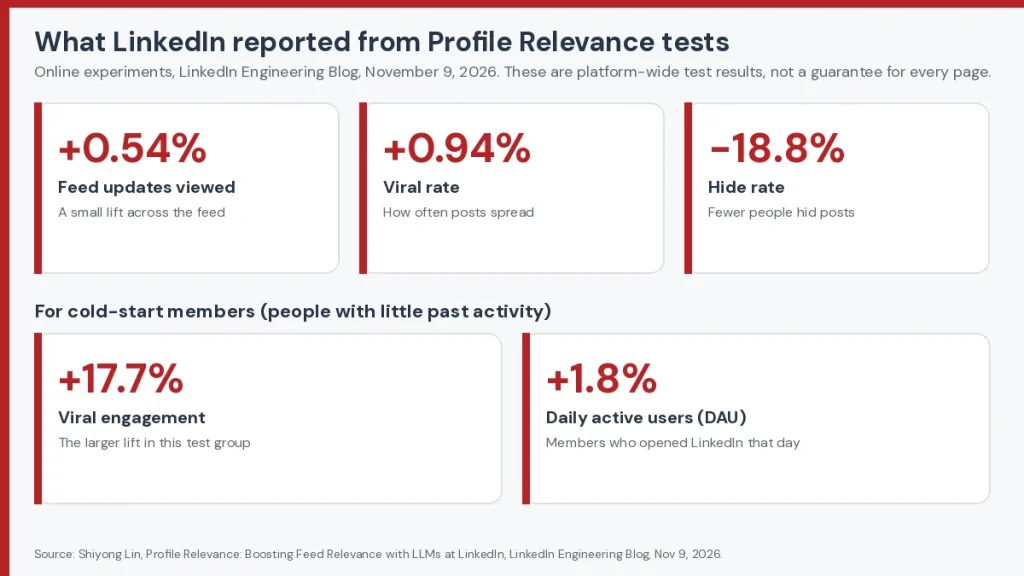
Be honest about the scale. The first two lifts are small. The 18.8% drop in hide rate, and the 17.7% viral engagement lift for members with little past activity, are the more noticeable figures. This is LinkedIn’s test data, not a promise for your next post.
Do this: when you review your next five posts, note whether anyone outside your company commented or shared, not only how many people saw them.
How do you write a LinkedIn post that reaches people you don’t follow?
Make it obvious who the post is for, in words a stranger and the system can both read. LinkedIn evaluates a post against topic, location, job title, company, industry, seniority, and education.
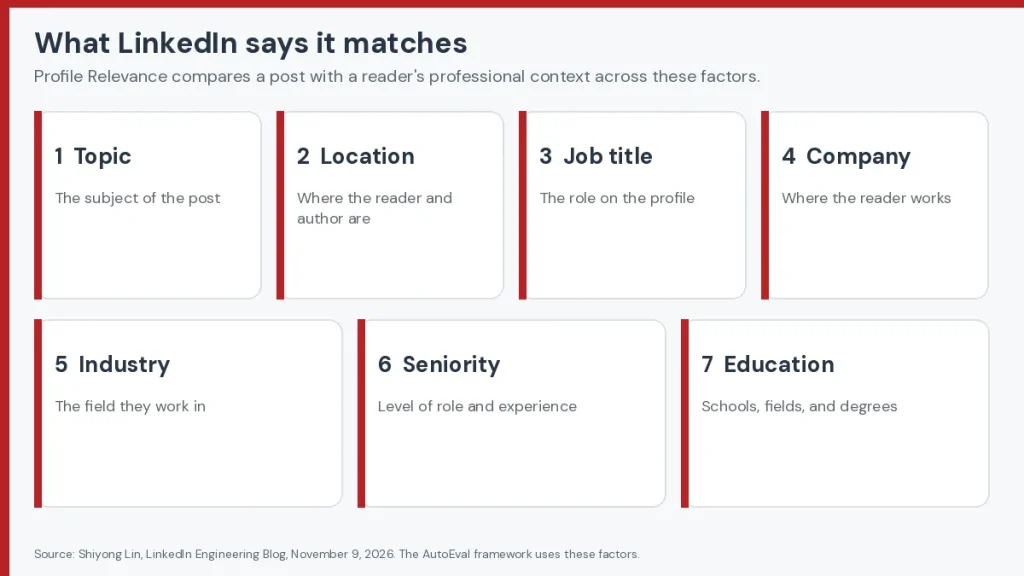
There is also a gate. LinkedIn says a post must receive one like, comment, or share from an unconnected member, meaning someone not already in your network, before Profile Relevance will recommend it. Write the opening for a stranger, not only for your coworkers.
- Name the reader in the first line. Use a role, industry, or place, such as commercial brokers in Johns Creek or in-house counsel at North Atlanta firms.
- State one professional problem. One point per post is easier for a reader, and for the system, to match.
- If you film, say the topic, role, and place out loud. LinkedIn uses transcripts, so spoken words count.
- Write the opening for someone outside your company. That first reaction from a non-connection is the gate LinkedIn described.
- Mention a real place when it is true. Location is one of the match factors, so Alpharetta, Milton, or Cumming can help when the work is actually there.
Do this: rewrite the first sentence of your last LinkedIn post so it names the buyer, then post that version next.
Does this change how you should film LinkedIn video?
It adds a writing and speaking job to the filming job. Format still matters. Our recent post on LinkedIn video strategy and wide versus vertical video still applies. This update adds that the words in the post, and the words you speak on camera, also decide who may see it.
A wide video that explains one process, with the point spoken early, is easier for a stranger to recognize. A vertical clip can still work as a short follow-up. The Video Placement Toolkit covers crop-safe sizes if you cut both from one shoot.
Do this: on your next video, say one sentence that names the audience before you make the point.
Social Pro Video take
The practical change is simple. Name the buyer in the first sentence. Say the point out loud if you are on camera. Make the post useful to a stranger in your industry, not only to people who already work with you.
We serve Corporate • Tech • Commercial • Professional clients across North Atlanta, and the same opening test applies to all of them. If a commercial property team in Alpharetta or a professional firm in Cumming would not know the post was for them, LinkedIn may not know either. These are LinkedIn’s experiment results, so test the approach on your own page before you treat it as a rule.
What should you do on your next post?
Use this checklist before posting.
Checklist: is this post ready for people you don’t follow?
- The first line names a role, industry, or place
- The post makes one point a buyer can use
- If it is a video, the topic is spoken, not only shown as text
- A stranger outside your company could tell it is for them
- You can notice the first comment or share from someone you do not already know
FAQ
What is LinkedIn Profile Relevance?
It is LinkedIn’s name for a system that matches a post to a reader’s professional background, so the post can show up for people who do not already follow you. It uses profile details the member chose to share, such as headline, summary, skills, work history, and education.
Do these test results mean every post will get more reach?
No. The numbers come from LinkedIn’s online experiments, reported on November 9, 2026. The lifts in feed updates viewed (0.54%) and viral rate (0.94%) are small. The 18.8% drop in hide rate, and the 17.7% rise in viral engagement for members with little past activity, are more noticeable. Treat them as a reason to test, not a promise for your page.
Does this change how I should film LinkedIn video?
It adds a writing and speaking job to the filming job. LinkedIn uses post text, titles, and transcripts, so say the topic, role, and place out loud, not only on screen. Format still matters; see our recent post on wide versus vertical LinkedIn video.
Why does the first comment or like from a stranger matter?
LinkedIn says a post must receive one like, comment, or share from someone not already connected to you before Profile Relevance will recommend it. Write the opening so a stranger in your industry can tell the post is for them.
Where can I read LinkedIn’s own explanation?
Read Shiyong Lin’s November 9, 2026 post, Profile Relevance: Boosting Feed Relevance with LLMs at LinkedIn, on the LinkedIn Engineering Blog, linked below.
Next step
Start with the plan. Grab the free Video Placement Toolkit for crop-safe specs, a posting calendar, and a one-shoot workflow. When you want help producing it, book a free 15 minute discovery call. You can also see our social media video and corporate video services.
Sources: Shiyong Lin, “Profile Relevance: Boosting Feed Relevance with LLMs at LinkedIn,” LinkedIn Engineering Blog, November 9, 2026. Andrew Hutchinson, Social Media Today, November 9, 2026, which reported the same test figures.
About the author: Nate Sampson is the producer behind Social Pro Video in Alpharetta, GA. Social Pro Video is a video production company in Alpharetta, Georgia, led by Nate Sampson, serving North Atlanta Corporate • Tech • Commercial • Professional clients. Call 404-491-0776 or send a message through the contact page.
Disclosure: drafted with research and editing help from AI tools, then reviewed for voice, facts, and local fit by Social Pro Video.